Rocrail is here

One of the best automation software is RocRail.

It is freeware, but you may donote for 12 Euro/year to support those software developers.

Key Features

  • Automation: Run some trains automatically while you control others by hand.
  • Cross-Platform: Works on Linux, Windows, macOS, and Raspberry Pi OS.
  • Client-Server Design: Uses a server and the Rocview client to let you control layouts over your home network or the internet.

Check your command station compatibility here.

1 Like

Agreed, I think there is a free version but at the 12 euro that is a very fair price.

you can use the whole feature for free.

12 Euro/year is donation.

You will get a littleee bit more feature. it is nice to have feature.

detail is here, at “extra” section

1 Like

Great freeware! But watch some youtube video’s first to get a basic understanding.

RocRail needs some learning curve.

It is not step by step that you just click next, next, next then finish.

One configuration can be accessed from several menus. If you understand the setting concept, you will know where you will configure the parameter.

RocRail has offline PDF file in german language only. For english language, it is screen capture from the website.

Mostly, I read/search the configuration on website.

The online manual starts from here.

then you start step by step tutorial.

Rocrail webboard is here, both german and english language.

https://www.rocrail.info/

1 Like

Don’t expect that you will read the whole manual through.

RocRail manual is for those who understand RocRail concept. After you understand the concept, then you dig around on topic you want to know more.

What is RocRail concept?

  1. All tracks must be defined in “block”. Each locos runs from block to another block and so on.

  2. Normally, there is NO 2 locos in the same block, except it is staging block. (where you park your loco in the same track). Staging block needs different configuration.

  3. Each block starts and ends at the turnout (or switch). Turnout/switch is not in any block at all. You read more from here.

Block is the smallest element in automation system.

When you set block, then you set some route.

  1. Each block will have at least 2 sensor for one train direction. If this block for two-way train direction, you will need 4 sensor.

When you have some block picture in your mind, then you start do some sensor track, sensor box (S88), some wiring from S88 back to command station.

If you come to this far, we can discuss more on software configuration.
1 Like

or…let me know if you want some automation 101 online class.

I think I can prepare some material to explain to you.

Online session is good with interactive, question+answer on your interest.

1 Like

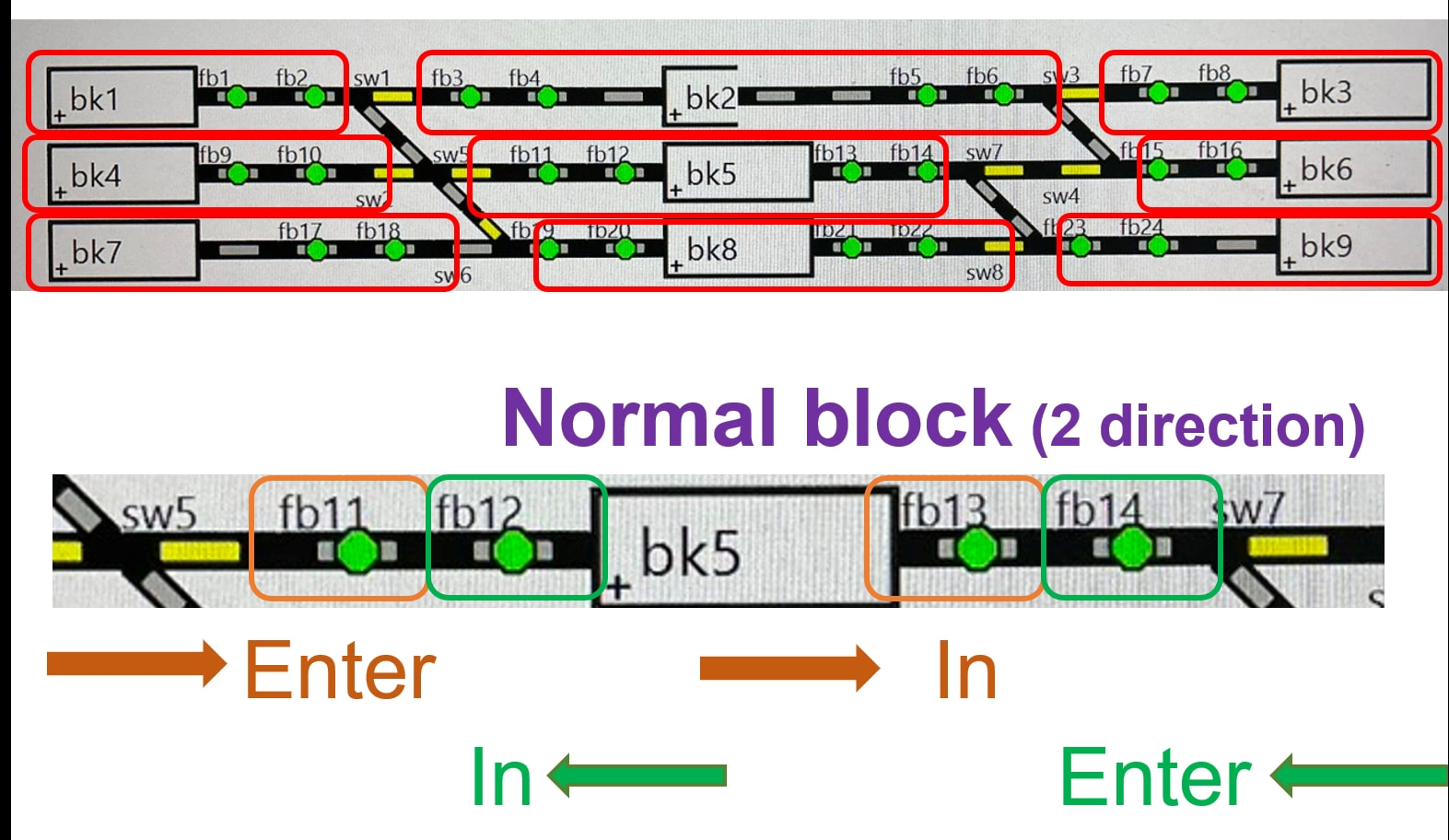
When I did some automation demonstration in JRM 2026, this is my layout with sensor planning.

We starts with the turnout position. We then separate each block with these turnout equipment. There are totally 9 blocks, bk1 → bk9.

I zoom in bk5 for an example.

On left–>right train direction, there are 2 sensor, fb11 (ENTER), fb13 (IN).

On right–>left train direction, there are 2 sensor, fb14 (ENTER), fb12 (IN).

**You can rename the sensor name (fb xx) , block name (bk xx) to any name you want.

There are totally 24 sensors.

S88 box supports up to 16 sensors.

Thus, I use S88 x 2 boxes, with at least 24 wire cable from each contract track to S88.

1 Like